
Verify in the field.
Act with confidence.
FieldEnforce™ gives authorized officers a practical way to verify credentials, document violations, capture photographic evidence, and preserve the location of an incident—even without network service.
The mobile experience
The tools an officer needs.
Where the work happens.
Scroll through an enforcement event, from the first credential scan to a submitted report.
Scan & identify
Scan a credential QR code to associate field work with the appropriate licensing record.
Real app screenOpen enforcement
Review the credential and start a new enforcement action from the mobile license record.
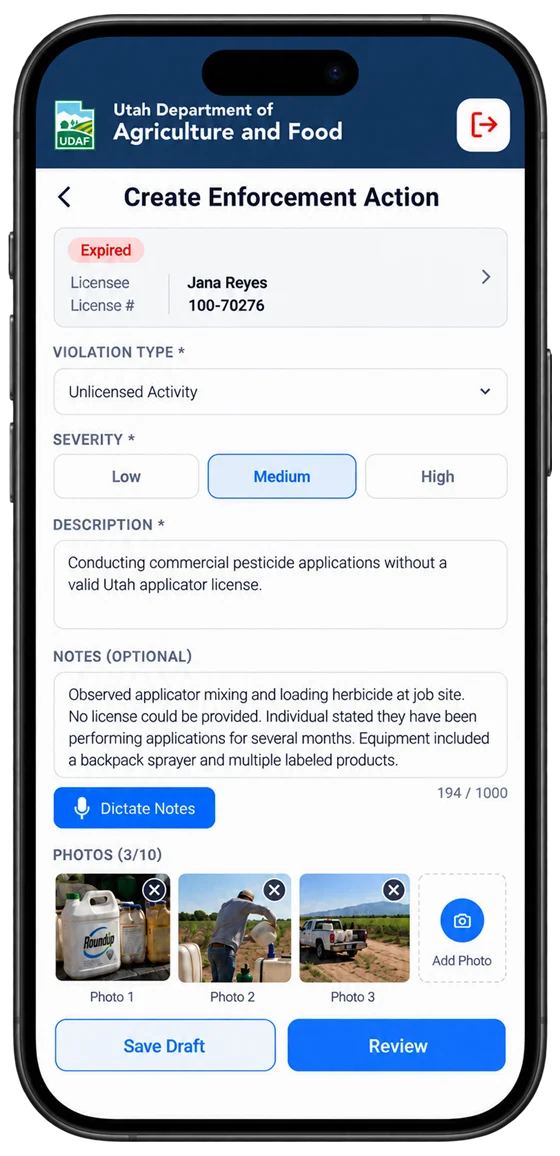
Real app screenDocument the incident
Choose the violation and severity, dictate or type the notes, and capture photographic evidence. The linked license stays in view.
Design illustrationReview & submit
Review the summary, the original GPS fix and the officer-confirmed incident address, then submit or save a draft.
Design illustrationStay productive offline
Offline drafts and pending actions remain available for synchronization when connectivity returns.
Real app screenTrack submitted cases
Submitted enforcement actions remain visible in history, including cases awaiting administrative review.
Real app screenScreens illustrate the mobile app workflow. Where marked, screens are design illustrations of the enhanced release, and example agency, license and case details are for demonstration only. Screens may vary by device, jurisdiction and enabled features.
From the field to the office
The full picture. Before the decision.
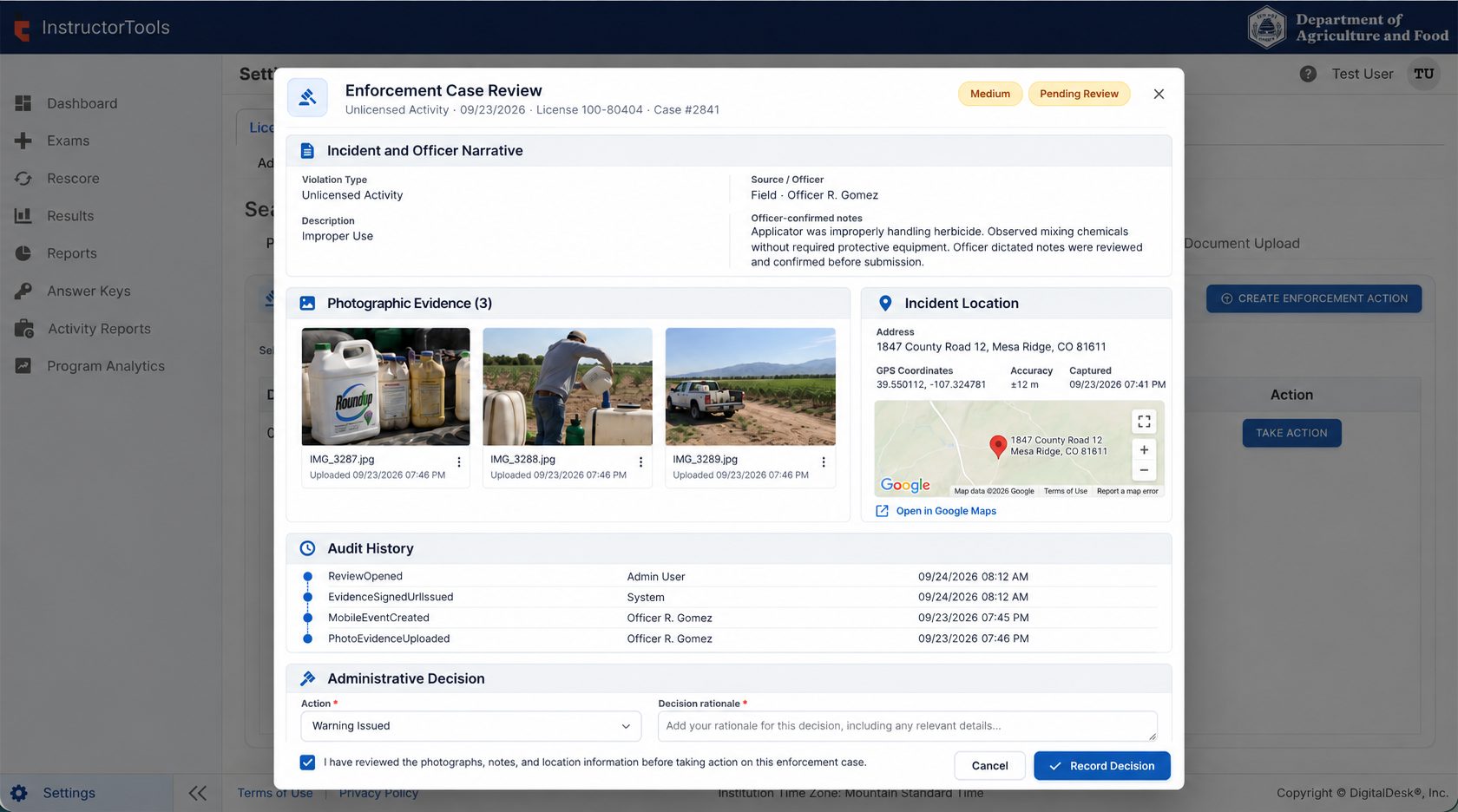
FieldEnforce™ connects officers’ field reports to LearningSuite InstructorTools. Authorized reviewers can inspect photographs, notes, original GPS coordinates, address information and activity history before recording an official decision.
- 1Photographic evidenceFull-size inspection with original and supplemental attachments.
- 2Geolocation contextIncident coordinates, accuracy, confirmation and Google Maps.
- 3Chronological audit historyEvery step, who did it, and when.
- 4Accountable decisionRequired evidence acknowledgment before an action is recorded.
1234
Illustrative InstructorTools enforcement review design. Example case data is shown for demonstration purposes.
Built for regulatory field work
Field efficiency, without sacrificing accountability.
Practical mobile capabilities supported by secure licensing data and human-led review.
Credential verification
Use QR codes to connect field observations with the license being reviewed.
Work offline
Record incidents, capture photos and synchronize when connectivity becomes available.
Photographic evidence
Attach original or supplemental photos through private GCS storage and short-lived signed URLs.
Location and address
Preserve original GPS coordinates, accuracy and capture time alongside the officer-confirmed address.
Voice-to-text notes
Dictate on supported devices, then review and edit the transcript as the official field narrative. Raw audio is not retained.
Audited administrative review
Review case evidence and acknowledge the record before recording regulatory action.
Connected process
One incident. One traceable record.
Scan a credential and associate the field observation with the correct license.
Capture notes, violation details, photographs and incident location.
Safely submit the event when a network connection becomes available.
Consider the evidence, acknowledge the case and record an auditable decision.
FieldEnforce™ for LearningSuite
Better field documentation.
Stronger regulatory follow-through.
See how mobile enforcement reporting and connected administrative review can support your agency’s licensing operations.
Talk to DigitalDesk